

This guide shows you how to enable gamma controls on your ARK: Survival Evolved server and adjust brightness in-game with the gamma command.
Order an ARK: Survival Evolved server today with Citadel Servers
What Are Gamma Controls in ARK?
Gamma controls let players change the brightness of their game using a simple console command — ideal for brightening up pitch-black caves and night time, or darkening the world for a horror-themed or Halloween event. On ARK servers, players can only use the gamma command if the server allows it, and that permission is not enabled by default on PvP servers. Whether gamma is allowed is controlled by two settings in your server's GameUserSettings.ini file, which you can edit in a couple of minutes from your Citadel Servers game panel.
How to Enable Gamma on Your ARK Server
- Log in to your Citadel Servers game panel and Stop your ARK server.
- Click Config Files on the left-hand side.
- Open the GameUserSettings.ini file for editing.
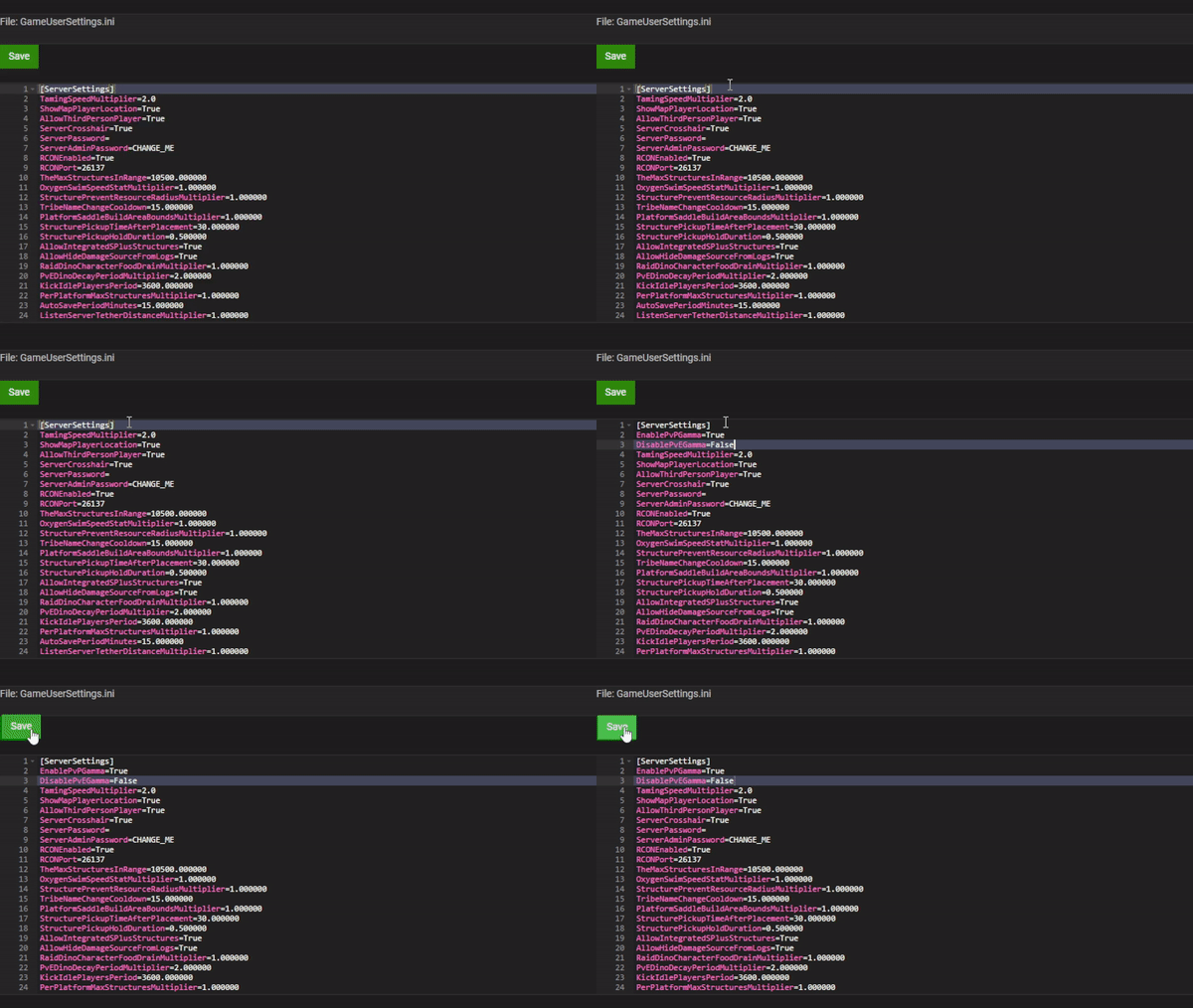
- Copy and paste the following settings under the [ServerSettings] section:
EnablePvPGamma=True DisablePvEGamma=False - Save the file, then Start your server again.
What the Two Settings Do
- EnablePvPGamma=True — allows players to use the gamma command on a PvP server (blocked by default).
- DisablePvEGamma=False — keeps the gamma command available on a PvE server (allowed by default; set to True to block it).
How to Use the Gamma Command In-Game
Enabling the settings only gives players permission — each player then sets their own brightness in-game with a console command:
- Launch ARK: Survival Evolved and join your server.
- Once the game has loaded, press TAB to open the console.
- Type gamma [value] and press Enter — for example,
gamma 5sets half the maximum brightness.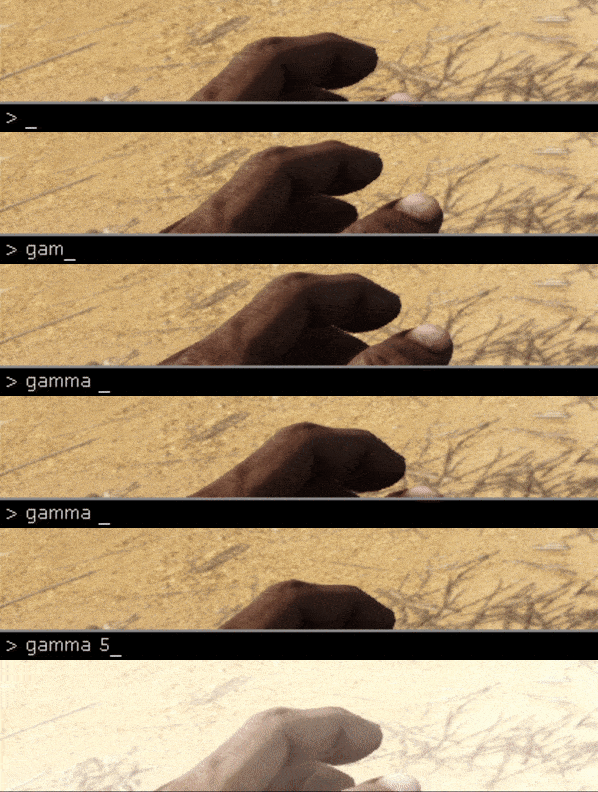
- You should see the change on screen immediately.
Useful Gamma Values
- 2.2 — the game's default brightness (use this to revert your changes).
- 0–2 — darker than normal; good for horror events and atmospheric builds.
- 3–5 — noticeably brighter; makes caves and night time much easier to see.
- 10 — maximum brightness.
The command accepts any value from 0 to 10, including decimals (for example, gamma 2.8). The setting is per-player and only affects the player who runs the command — it does not change brightness for everyone on the server.
Troubleshooting
- The gamma command does nothing — make sure the settings were added under [ServerSettings] (not another section), the file was saved while the server was stopped, and the server was restarted afterwards.
- The console won't open with TAB — check your key bindings under the game's options; the console key can be rebound.
- Settings keep resetting — always stop the server before editing config files; edits made while the server is running can be overwritten on shutdown.
Still stuck? Our support team is available 24/7 — submit a support ticket and we'll be happy to help. You can also browse more guides in our knowledgebase.
Rent your own ARK: Survival Evolved server — instant setup, worldwide locations and one-click mod installs.