

This guide will walk you through adding a custom Server Game ID to your Core Keeper server.
Click here to order your Core Keeper server with Citadel Servers today!
A custom Server Game ID allows players to reconnect using the same Game ID even after the server restarts. By default, Core Keeper generates a new Game ID every time the server starts, which can make reconnecting inconvenient for players. Setting a custom Game ID keeps connections consistent and easier to manage.
1. Log in to your Citadel Servers Game Panel and stop your server.
2. Navigate to the configuration file tab, then click the config editor of your main configuration file.
3. Locate the game ID line and edit it to your preferred name.
Note: ID must be 15–28 characters long, alphanumeric only, and must not include 0, I, O, Y, l, o, x, or y.
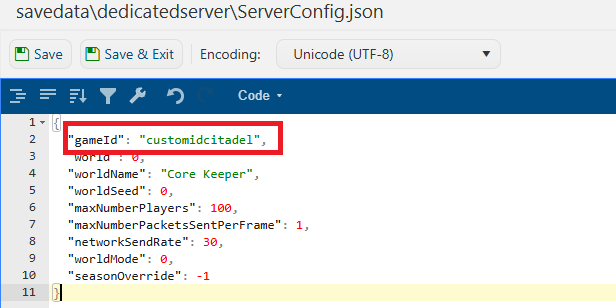
4. Save, then start your server.
Did the above information not work for you?
Please click here to contact our support via a ticket.